Building Case Analyst · Part 4 of 8
Field Link: a data-driven branching dialogue engine in Flutter
TL;DR — Field Link is the in-game chat where a field agent feeds you leads and you pick replies. It's built from immutable Dart models, driven by a single Riverpod Notifier, and decoupled from gameplay by an event bus: the chat never touches mission state directly — it just fires OptionSelected, and the scenario manager decides what that choice means (evidence gained, trace raised, modules unlocked, next step queued).
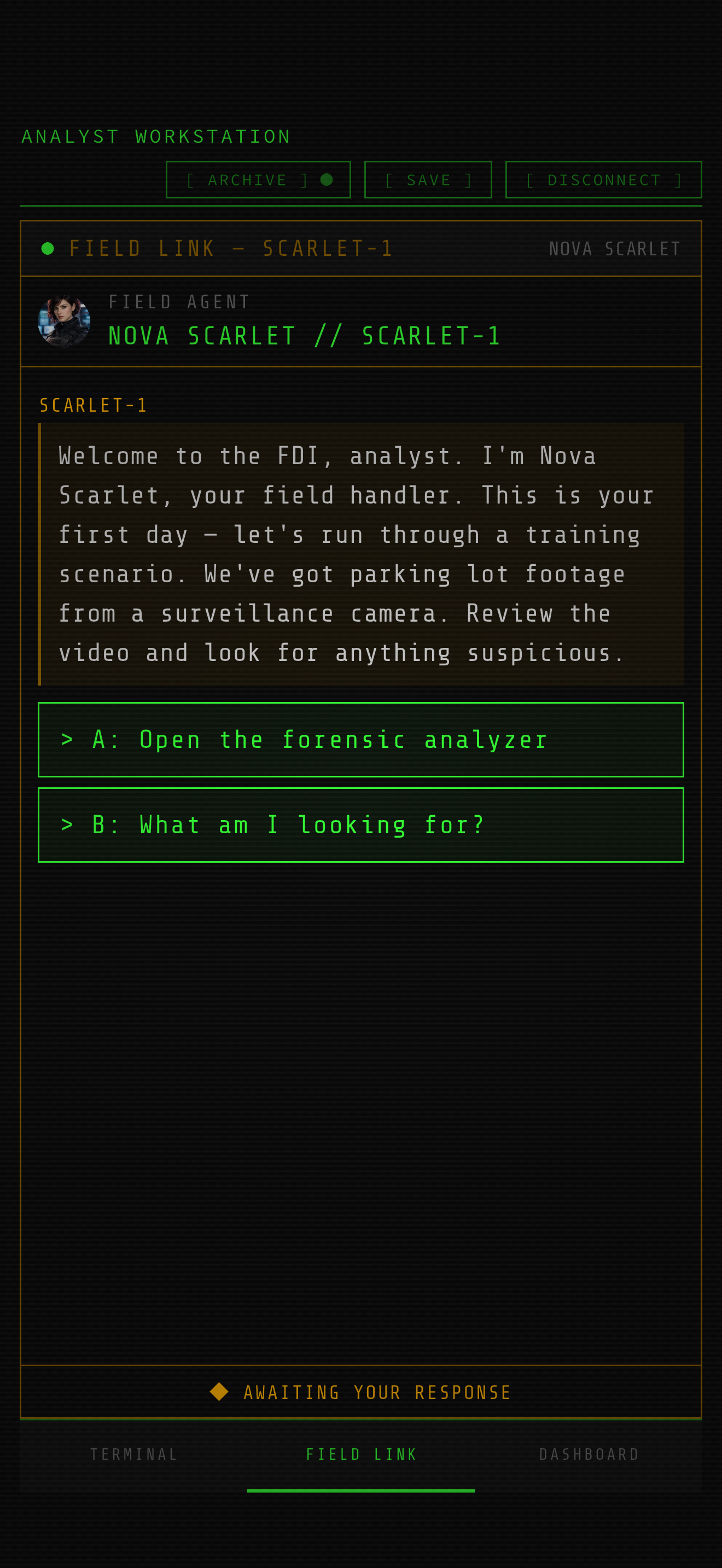
Three in the morning, the terminal glow on your face, and a message slides in from a callsign you've only ever seen in a redacted file. The agent has eyes on the scene; you have a keyboard and a deadline. That's Field Link — the encrypted comms panel that turns a static case briefing into a back-and-forth where your answers actually move the investigation.
Underneath the noir, it's a fairly small dialogue engine. No timeline editor, no third-party narrative library — just a chat UI wired to mission data. What makes it interesting is the seam: the chat widget knows nothing about evidence or timers, and the mission logic knows nothing about bubbles or typing indicators. They only meet at an event bus. Let me walk through it.
The models: small, immutable, JSON-aware
Everything the chat renders is plain data. A conversation is a list of messages; some messages are a menu of choices. All of it is @immutable with fromJson/toJson, because the same shapes that drive the UI are also what gets written to a save file.
enum MessageType { text, choice, typing, system }

@immutable
class ChatChoice {
  final String id;
  final LocalizedString label;
  const ChatChoice({required this.id, required this.label});
}

@immutable
class ChatMessage {
  final String id;
  final String sender;
  final String text;
  final DateTime timestamp;
  final MessageType type;
  final List<ChatChoice> choices;
  final bool isPlayer;

  /// Command hints embedded in this message (e.g. ["scan FD 304 KD"]).
  final List<String> hintCommands;
  // ...const constructor with defaults
}
A couple of decisions paid off here. First, type is an enum rather than a subclass hierarchy — a "choice" message is just a ChatMessage whose choices list is non-empty, so the rendering code can switch on one field instead of pattern-matching types. Second, labels are LocalizedString, not String: the dialogue ships in multiple languages, and the model carries every locale until the widget resolves it with the current AppLocalizations. That's why you'll see choice.label(l10n) rather than a bare string everywhere.
The hintCommands field is a Case-Analyst-specific twist. The agent will say things like "run a scan FD 304 KD on that plate" — and on easier difficulties those substrings become tappable chips that fire the command straight into the terminal. The chat parses those out itself; I'll come back to it.
The top-level container is the Conversation, and it carries the two transient UI flags that the whole engine pivots on:
@immutable
class Conversation {
  final String agentName;
  final String agentCallsign;
  final List<ChatMessage> messages;
  final bool isTyping;        // show the "agent is typing…" indicator
  final bool awaitingChoice;  // choices are live and tappable

  const Conversation({ /* ... */ });

  Conversation copyWith({ /* every field nullable */ }) { /* ... */ }
}
Note that isTyping is deliberately not serialized — Conversation.fromJson hardcodes isTyping: false. A typing animation that survives a save/restore would be a ghost; the restore path should never resurrect a transient state.
The notifier: a Riverpod state machine
All the behavior lives in one Notifier<Conversation>. It holds the conversation as its state and keeps the mission's narrative graph in private fields — a map of steps keyed by name, plus the scan targets used for hint detection.
class ChatNotifier extends Notifier<Conversation> {
  late EventBus _bus;
  String? _currentStep;
  int _msgCounter = 0;
  Map<String, MissionStep> _missionSteps = {};
  List<ScanTarget> _scanTargets = [];
  AppLocalizations? _l10n;

  @override
  Conversation build() {
    _bus = ref.watch(eventBusProvider);
    final advanceSub = _bus.on<MissionAdvanced>().listen(_onMissionAdvanced);
    ref.onDispose(() => advanceSub.cancel());
    return const Conversation(agentName: '', agentCallsign: '');
  }
}
The build() method does the one thing Riverpod's lifecycle makes easy to get wrong: it subscribes to the event bus and registers the matching onDispose in the same breath, so the subscription can't outlive the provider. The notifier listens for MissionAdvanced — that's how gameplay pushes the next beat of dialogue into the chat without the chat ever polling.
A mission is loaded by copying its steps into the lookup map and resetting counters:
void initFromMission(MissionConfig config) {
  _currentStep = null;
  _msgCounter = 0;
  state = Conversation(
    agentName: config.agentName,
    agentCallsign: config.agentCallsign,
  );
  _missionSteps = {for (final step in config.steps) step.key: step};
  _scanTargets = config.scanTargets;
}
Playing a step
The heart of the engine is _playStep. Given a step key, it fakes the agent "typing", appends the message, and then either offers choices or auto-advances to the next step after a beat. The deliberate delays are what make a synchronous data structure feel like a live conversation.
Future<void> _playStep(String stepKey) async {
  final l10n = _l10n;
  if (l10n == null) return;
  final step = _missionSteps[stepKey];
  if (step == null) return;

  state = state.copyWith(
    isTyping: true,
    awaitingChoice: step.choices.isNotEmpty,
  );
  await Future.delayed(const Duration(milliseconds: 1500));

  final agentText = step.agentText(l10n);
  final hints = _detectHints(agentText);

  final msg = ChatMessage(
    id: _nextId(),
    sender: state.agentCallsign,
    text: agentText,
    timestamp: DateTime.now(),
    type: MessageType.text,
    hintCommands: hints,
  );
  state = state.copyWith(isTyping: false, messages: [...state.messages, msg]);

  final choices = step.choices;
  if (choices.isNotEmpty) {
    await Future.delayed(const Duration(milliseconds: 600));
    final choiceMsg = ChatMessage(
      id: _nextId(), sender: 'SYSTEM',
      text: l10n.fieldLinkSelectResponse,
      timestamp: DateTime.now(),
      type: MessageType.choice, choices: choices,
    );
    state = state.copyWith(
      messages: [...state.messages, choiceMsg],
      awaitingChoice: true,
    );
  } else if (step.nextStep != null) {
    await Future.delayed(const Duration(milliseconds: 2000));
    _currentStep = step.nextStep;
    await _playStep(step.nextStep!);
  }
}
Two things to flag. First, the recursion at the bottom: a step with no choices but a nextStep just plays the next one after a two-second pause, so a whole monologue can unspool from a single trigger. Second, every state update is a fresh copyWith with a brand-new list ([...state.messages, msg]) — never a mutation. Riverpod diffs by identity, so a new list is what makes the ListView rebuild and the auto-scroll fire.
The seam: a choice doesn't change the game — it announces itself
This is the part I'm happiest with. When you tap a reply, the notifier does not award evidence, raise your trace level, or unlock a module. It records your line in the transcript, closes the choice menu, and fires one event:
Future<void> selectChoice(String choiceId, {required MissionPhase phase}) async {
  if (phase != MissionPhase.active) return;
  final l10n = _l10n;
  if (!state.awaitingChoice || _currentStep == null || l10n == null) return;

  final step = _missionSteps[_currentStep!];
  if (step == null) return;
  final chosen = step.choices.where((c) => c.id == choiceId);
  if (chosen.isEmpty) return;

  final playerMsg = ChatMessage(
    id: _nextId(), sender: 'ANALYST',
    text: chosen.first.label(l10n),
    timestamp: DateTime.now(),
    type: MessageType.text, isPlayer: true,
  );
  state = state.copyWith(
    messages: [...state.messages, playerMsg],
    awaitingChoice: false,
  );

  _bus.fire(OptionSelected(choiceId: choiceId, stepKey: _currentStep!));
}
The guard clauses are doing real work: you can't answer a dead conversation (!awaitingChoice), you can't answer when the mission isn't active (e.g. paused or already lost), and you can't answer with an ID that doesn't belong to the current step. After that, the chat's job is over. It hands a choiceId and a stepKey to the bus and lets go.
On the other side of the seam, the ScenarioManager — the actual game director — is listening. It owns mission state, so it's the one allowed to change it:
void _handleOption(OptionSelected event) {
  if (state.phase != MissionPhase.active || _config == null) return;

  final step = _config!.steps.where((s) => s.key == event.stepKey);
  if (step.isEmpty) return;

  final outcome = step.first.choiceOutcomes[event.choiceId];
  if (outcome == null) return;

  _applyOutcome(
    evidenceGain: outcome.evidenceGain,
    traceDelta: outcome.traceDelta,
    timerDelta: outcome.timerDelta,
    unlockModule: outcome.unlockModule,
    unlockCommands: outcome.unlockCommands,
    startTimer: outcome.startTimer,
  );

  if (outcome.terminalMessage != null && _l10n != null) {
    _bus.fire(PushTerminalMessage(text: outcome.terminalMessage!(_l10n!)));
  }
  _fireForensicMedia(outcome.loadForensicMedia);

  if (outcome.nextStep != null) {
    state = state.copyWith(
      completedSteps: {...state.completedSteps, event.stepKey},
      currentStepKey: outcome.nextStep,
    );
    _bus.fire(MissionAdvanced(stepKey: outcome.nextStep!, chatStepKey: outcome.nextStep));
  }
}
So the branching lives entirely in data. Each step carries a Map<String, StepOutcome> choiceOutcomes, and a StepOutcome is a little bundle of consequences: evidenceGain, traceDelta, timerDelta, an optional unlockModule or list of unlockCommands, a terminalMessage, forensic media to preload, and the nextStep to branch to. Picking "play it safe" versus "lean on the contact" can hand you different evidence, a different trace cost, and a different next message — all without a line of branching code.
And the loop closes itself: when the scenario manager fires MissionAdvanced with a chatStepKey, the notifier's _onMissionAdvanced handler picks it up and calls _playStep again. Choice → event → state change → event → next message. The same path also lets a terminal command, not just a chat reply, advance the dialogue — because the command ends up firing MissionAdvanced too.
Why bother with a bus?
I could have given the chat a reference to the scenario manager and called a method. The bus buys me three things. It keeps the chat testable in isolation — I can pump steps and assert on the transcript without standing up the whole mission. It means terminal, forensic analyzer, and Field Link all advance the narrative through one mechanism instead of three bespoke wirings. And it makes the data the single source of truth: designing a branch is editing a JSON mission, never touching Dart.
The UI: a ListView that knows three bubble types
FieldLinkWidget is a ConsumerStatefulWidget that watches chatProvider and renders the messages with a ListView.builder. The branching in the view is as flat as the model: if a message's type is choice, draw a _ChoiceBubble; otherwise a _MessageBubble; and if isTyping is set, append one extra _TypingIndicator row at the end.
itemCount: conversation.messages.length + (conversation.isTyping ? 1 : 0),
itemBuilder: (context, index) {
  if (index == conversation.messages.length) {
    return _TypingIndicator(/* animated dots */);
  }
  final msg = conversation.messages[index];
  if (msg.type == MessageType.choice) {
    return _ChoiceBubble(
      message: msg,
      enabled: conversation.awaitingChoice,
      onSelect: (choiceId) {
        final phase = ref.read(scenarioManagerProvider).phase;
        ref.read(chatProvider.notifier).selectChoice(choiceId, phase: phase);
      },
    );
  }
  return _MessageBubble(message: msg, /* ... */);
}
The choice bubble passes enabled: conversation.awaitingChoice down, so once you've answered, the old options grey out and stop responding to taps — they stay on screen as a record of the menu, but they're inert. Notice the view reads phase at the moment of the tap and forwards it; the notifier double-checks it. Belt and suspenders, but a paused mission swallowing a stray tap is exactly the kind of bug that's miserable to reproduce.
Auto-scroll and a gotcha I lost an hour to
Keeping a chat pinned to the bottom is the classic Flutter trap: right after you append a message, the ListView hasn't laid out the new child yet, so maxScrollExtent is still the old value and you scroll to one message short. The fix is a double addPostFrameCallback — wait one frame for the build, a second frame for the layout, then animate:
void _scrollToBottom() {
  WidgetsBinding.instance.addPostFrameCallback((_) {
    WidgetsBinding.instance.addPostFrameCallback((_) {
      if (_scrollController.hasClients) {
        _scrollController.animateTo(
          _scrollController.position.maxScrollExtent,
          duration: const Duration(milliseconds: 200),
          curve: Curves.easeOut,
        );
      }
    });
  });
}
The widget tracks _prevMessageCount and the previous typing flag so it only scrolls on an actual change, and — a small touch — it fires a messageIn sound through the bus whenever a new message arrives that isn't the player's own. The hint chips from earlier live in _HintAwareText, which splits the message into spans around each detected command and, depending on difficulty, renders them as tappable green chips (easy) or redacted ▓▓▓ blocks you can reveal at a cost (hard).
Takeaway
The whole engine core — models plus notifier — is about 350 lines across two files, and almost none of it is "dialogue logic" — it's plumbing. The lesson I keep relearning as a solo dev: put the content in data and the consequences behind an event, and the code that's left is small enough to fit in your head at 3 a.m. The chat draws bubbles. The mission decides meaning. They share a bus and nothing else, and that one boundary is what lets me write a branching conversation in JSON instead of in if statements.
The series
- Building a detective game in pure Flutter (no game engine)
- An in-game terminal with a real command parser
- A forensic image analyzer: enhance, thermal & deepfake detection
- Field Link: a data-driven branching dialogue engine
- A data-driven mission & narrative engine (21 missions)
- One codebase to iOS, Android, macOS, Windows & Steam
- The AI asset pipeline of a solo indie game
- Shipping a Flutter game solo: what worked, what I'd change
Case Analyst is a cyberpunk detective game where you investigate by typing real commands in a terminal — out on mobile, coming to Steam on October 29. Wishlist it on Steam, and follow for the next part.
Where to find Case Analyst
- Official site: case-analyst.com
- Steam (launches October 29 — wishlist now): store.steampowered.com
- iOS: App Store · Android: Google Play
- Follow: YouTube · Instagram · TikTok · Discord