Building Case Analyst · Part 6 of 8
One Flutter codebase to iOS, Android, macOS, Windows & Steam
TL;DR — Case Analyst is one Flutter codebase that ships to five targets. The same widget tree reflows from a stacked phone UI to a side-by-side desktop one through a tiny LayoutClass enum; the same video_player calls run on Windows thanks to a one-line media_kit shim; and monetization swaps at runtime — in-app purchase on mobile, store-handled pricing on Steam. The painful part wasn't Flutter. It was SteamPipe.
The promise of "one codebase, every platform" is the reason I picked Flutter for a game in the first place (Part 1 covers why I skipped a game engine entirely). The reality is more honest: Flutter handed me 90% for free, and the last 10% — Windows video, monetization, and getting a desktop build through Valve's packaging — is where the evenings went. This post is the field notes for that 10%.
One widget tree, two shapes
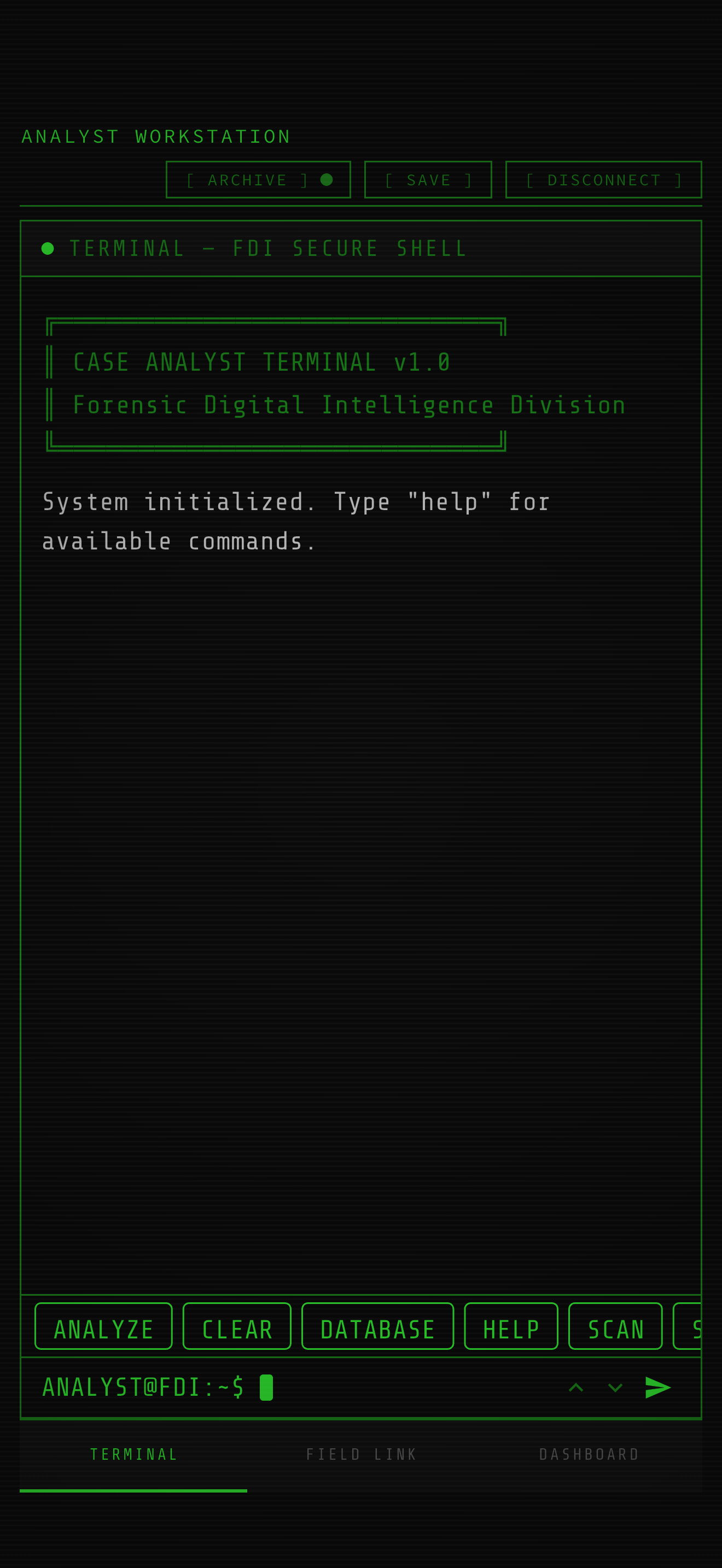
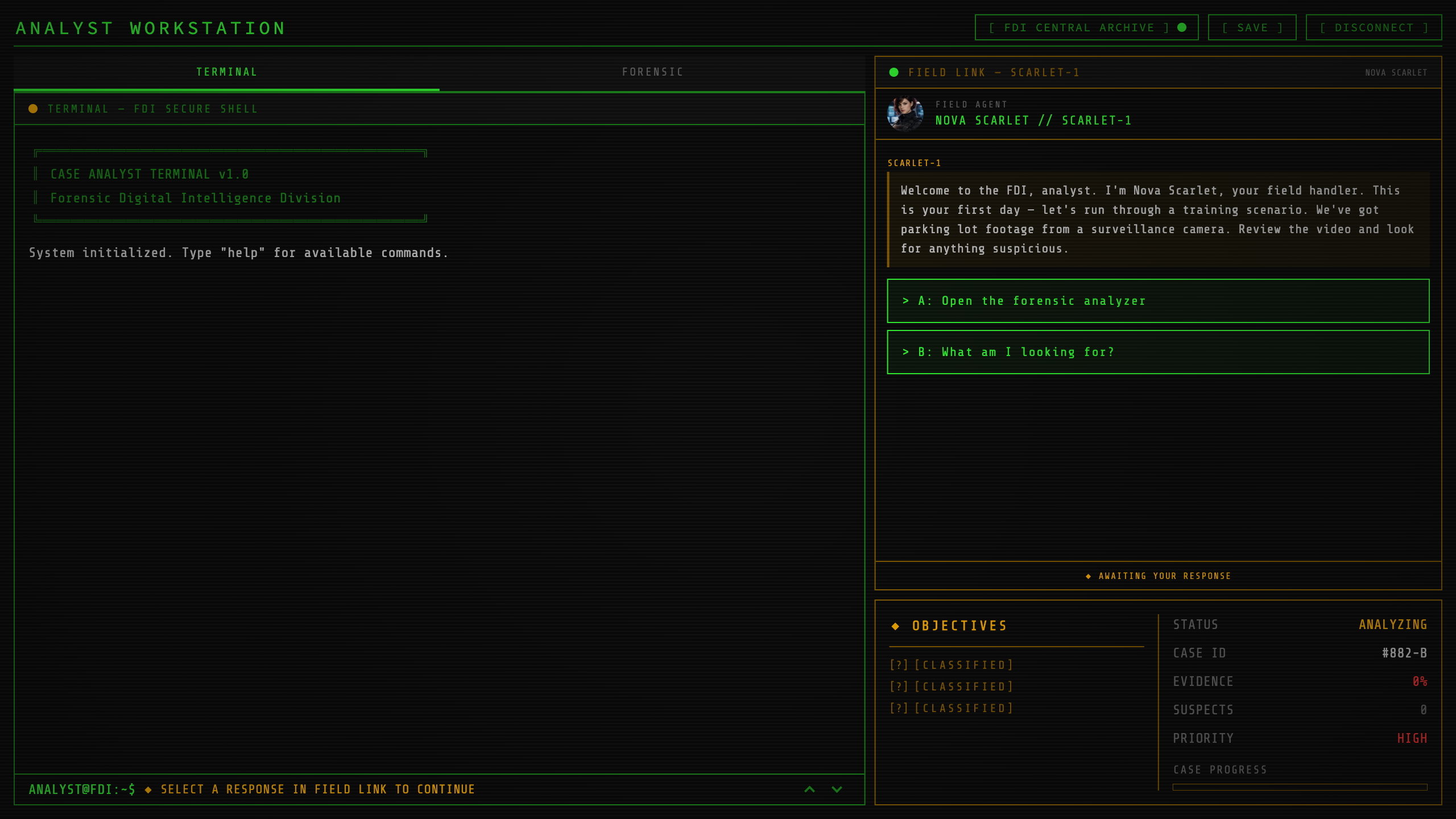
The detective desktop is the heart of the game — a terminal, a forensic analyzer, a case dashboard. On a phone those stack vertically and you swipe between them; on a laptop they sit side by side. I did not want two screens. I wanted one widget tree that knows how wide it is.
So the entire responsive system is one enum and one function, in lib/core/responsive/responsive_utils.dart:
abstract final class Breakpoints {
  static const double compact = 600; // phone
  static const double medium = 900;  // tablet portrait / narrow browser
}

enum LayoutClass { compact, medium, expanded }

LayoutClass layoutClassOf(double width) {
  if (width < Breakpoints.compact) return LayoutClass.compact;
  if (width < Breakpoints.medium) return LayoutClass.medium;
  return LayoutClass.expanded;
}
That's it. No device detection, no Platform.isIOS branching for layout — a layout class is a function of the available width, nothing else. A phone in portrait is compact; the same phone rotated, or a desktop window dragged narrow, becomes medium or expanded. Resize the macOS window and the UI reflows live, because the source of truth is LayoutBuilder constraints, not the OS.
The analyst desktop consumes it exactly where it lays out, in analyst_desktop_screen.dart:
child: LayoutBuilder(
  builder: (context, outerConstraints) {
    final layout = layoutClassOf(outerConstraints.maxWidth);
    final isCompact = layout == LayoutClass.compact;
    // ...
    child: isCompact
        ? _buildCompactLayout()   // stacked panels, phone
        : _buildWideLayout(),     // side-by-side panels, desktop
  },
)
Font sizing rides on the same enum. Instead of scattering magic numbers, there's a single canonical scale in app_font_sizes.dart where each slot is a record keyed by layout class:
abstract final class AppFontSizes {
  static const _body  = (compact: 16.0, medium: 11.0, expanded: 12.0);
  static const _title = (compact: 18.0, medium: 14.0, expanded: 16.0);
  // ...
  static AppFontSizesOf of(BuildContext context) {
    final width = MediaQuery.sizeOf(context).width;
    return AppFontSizesOf(layoutClassOf(width));
  }
}
Note the inversion: body is larger on compact (16) than expanded (12). On a phone you're holding glass close to your face and want chunky touch text; on a monitor you sit back and want dense, terminal-like information. Call sites stay clean — final fs = AppFontSizes.of(context); then fs.body — and "phones get bigger text" is a decision encoded in one table, not re-litigated per widget.
The same video calls, on Windows
Case Analyst plays video everywhere: the intro cinematic, forensic clips you scrub for evidence, archive footage. I wanted the official video_player API — VideoPlayerController.asset(...), .initialize(), the VideoPlayer widget — because it's stable and I already knew it. The catch: video_player has no first-party Windows backend.
The fix is a shim. video_player_media_kit re-implements the video_player platform interface on top of media_kit (libmpv under the hood), so my widget code never changes. The only platform-aware line in the whole stack lives in main.dart, before runApp:
VideoPlayerMediaKit.ensureInitialized(
  windows: true,
);
From then on, every video widget is platform-agnostic. The intro player, for example, doesn't know or care what OS it's on:
final VideoPlayerController controller;
if (kIsWeb && url.startsWith('assets/')) {
  controller = VideoPlayerController.networkUrl(/* local asset server */);
} else {
  controller = VideoPlayerController.asset(url);
}
controller.initialize().then((_) {
  controller.setVolume(ref.read(settingsProvider).videoVolume);
  controller.play();
}).catchError((Object error) {
  debugPrint('[IntroVideo] Failed to initialize: $error');
  // ... fall through, don't block the game on a bad clip
});
Two honest gotchas. First, media_kit drags in native libmpv DLLs via media_kit_libs_windows_video — that's a real chunk of bytes in the Windows build folder, and (foreshadowing) it matters for packaging. Second, the only platform branch you see above is for web, not Windows: web can't read bundled video as a file, so it streams from a tiny localhost asset server. Desktop and mobile both take the plain .asset(url) path. Always wrap initialize() in catchError — a clip that fails to decode on one platform should degrade gracefully, not freeze the screen.
Keeping the screen awake
A detective game has long stretches where you're reading a terminal dump or watching footage without touching the screen — exactly when a phone decides to dim and sleep. wakelock_plus handles it, and again the API is identical across platforms. I scope it to the screen's lifecycle so the lock is never left dangling:
@override
void initState() {
  super.initState();
  // ...
  WakelockPlus.enable();
}

@override
void dispose() {
  // ...
  WakelockPlus.disable();
  super.dispose();
}
On desktop this is effectively a no-op, which is fine — same call, no special case.
Monetization: IAP on mobile, the store on Steam
This is where "one codebase" needs a real seam. On iOS and Android the mobile build is freemium: play a slice, then unlock the full game via an in-app purchase. On Steam, you bought the game on the store page — there is nothing to unlock in-app, and in_app_purchase has no Windows implementation anyway.
I solved it with an abstract PurchaseService and a Riverpod provider that picks the implementation at runtime:
final purchaseServiceProvider = Provider<PurchaseService>((ref) {
  final PurchaseService service;
  if (kFreemiumMode && !kIsWeb && (Platform.isIOS || Platform.isAndroid)) {
    service = IapPurchaseService();   // real App Store / Play
  } else {
    service = PurchaseServiceStub();  // Steam, web, premium builds: all owned
  }
  ref.onDispose(() => service.dispose());
  return service;
});
kFreemiumMode is a compile-time flag — bool.fromEnvironment('FREEMIUM_MODE') — set per build via --dart-define in CI. The Steam build never passes it, so it gets the stub, which reports everything as owned. The rest of the app just asks a derived provider whether the game is unlocked and never touches platform code:
final fullGameOwnedProvider = Provider<bool>((ref) {
  if (!kFreemiumMode) return true;            // Steam / premium: unlocked
  final purchased = ref.watch(purchasedPacksProvider).value ?? const {};
  return purchased.contains(kFullGameUnlockId);
});
The mobile implementation, IapPurchaseService, wraps the official plugin: it listens to InAppPurchase.purchaseStream, completes a per-product Completer on a terminal event, caches owned product IDs in SharedPreferences for instant offline startup, and — a detail the stores enforce — acknowledges every transaction:
if (p.pendingCompletePurchase) {
  _iap.completePurchase(p);
}
Forget that and Apple/Google will auto-refund the purchase after a few days. The pricing label on the unlock button comes from queryProductDetails so it's always the store's localized price, never a hardcoded "€7.99". The whole monetization difference between an App Store build and a Steam build is one boolean and which concrete class the provider returns.
Packaging for Steam: the part that actually hurt
Building the binaries is the easy half. CI runs flutter build windows --release on windows-latest and flutter build macos --release on macos-latest, zips the output, and uploads artifacts. Flutter's desktop tooling just works.
SteamPipe — Valve's content upload system — is where I lost a submission. My first Windows + macOS build got rejected with a "disk write error" on Windows. The cause: I'd put both platforms' files in a single Steam depot. The macOS .app bundle contains symlinks and paths that differ only by case. macOS doesn't care; Windows is case-insensitive and has no symlinks, so the Steam client physically can't write those files and aborts the install.
The fix is structural: one depot per OS. Windows downloads only Windows files, macOS only the .app. The app build manifest (tool/steampipe/app_build.vdf) wires two depots:
"AppBuild"
{
    "AppID"   "4819580"
    "ContentRoot" "content/"
    "Depots"
    {
        "4819581" "depot_4819581_windows.vdf"   // Windows
        "4819582" "depot_4819582_macos.vdf"     // macOS
    }
}
And the Windows depot explicitly excludes macOS debris and debug symbols, mapping the staged folder under a windows/ subpath so it matches the Steam launch option (windows\case_analyst.exe):
"DepotBuild"
{
    "DepotID" "4819581"
    "ContentRoot" "windows/"
    "FileMapping" { "LocalPath" "*"  "DepotPath" "windows"  "Recursive" "1" }
    "FileExclusion" "*.pdb"
    "FileExclusion" "*.DS_Store"
}
Two hard-won notes for anyone shipping a Flutter desktop game to Steam:
- Stage the macOS
.appfrom macOS. If you unzip or repackage the bundle on Windows you destroy its internal symlinks and it won't launch. Copy it straight from the macOS build output. - Test from a clean machine before re-submitting. The "disk write error" only shows up on a real Windows install pulling from Steam, not in
flutter run. I add the game to Steam via a developer comp package and install it on a clean Windows box and a clean Mac before I ever click "mark as ready for review." Valve's review queue is too slow to use as your test loop.
Upload is then one steamcmd invocation pointed at the manifest:
steamcmd +login <partner_account> \
  +run_app_build "$(pwd)/tool/steampipe/app_build.vdf" \
  +quit
For full transparency: the same mixed-depot mistake also got the demo rejected, and Steam enforces a minimum wait (21 days from the app's first credit) before you can release the demo — so "ship to Steam" had a lot more calendar in it than code.
Takeaway
Flutter genuinely delivered one codebase across five targets, but the leverage came from putting the platform differences behind small, explicit seams: a LayoutClass enum for shape, a one-line media_kit shim for video, an abstract PurchaseService for money. Each seam is something I can read in ten seconds and reason about. The work that didn't fit that pattern — SteamPipe depots, case-insensitive bundles, review timing — wasn't Flutter's fault and wasn't Flutter's to solve. If you're taking a Flutter app to desktop and Steam, budget your time accordingly: a day for the code, a week for Valve.
The series
- Building a detective game in pure Flutter (no game engine)
- An in-game terminal with a real command parser
- A forensic image analyzer: enhance, thermal & deepfake detection
- Field Link: a data-driven branching dialogue engine
- A data-driven mission & narrative engine (21 missions)
- One codebase to iOS, Android, macOS, Windows & Steam
- The AI asset pipeline of a solo indie game
- Shipping a Flutter game solo: what worked, what I'd change
Case Analyst is a cyberpunk detective game where you investigate by typing real commands in a terminal — out on mobile, coming to Steam on October 29. Wishlist it on Steam, and follow for the next part.
Where to find Case Analyst
- Official site: case-analyst.com
- Steam (launches October 29 — wishlist now): store.steampowered.com
- iOS: App Store · Android: Google Play
- Follow: YouTube · Instagram · TikTok · Discord