Building Case Analyst · Part 2 of 8
An in-game terminal with a real command parser in Flutter
TL;DR — The core verb of Case Analyst is typing. Players investigate by entering commands into a fake forensic OS terminal. I built it as a pure Flutter TextField driving a Riverpod Notifier, a parser that returns a typed record (lines + clear-screen + navigation), command history on the arrow keys, and a typewriter animation per line. Commands are gated by the mission, so the same parser unlocks new verbs as the story progresses.
The whole game pretends to be a forensic operating system. There's no "press X to investigate" — you sit at a green-phosphor terminal and you type: scan, decrypt, trace. If the game's spine is a command line, the command line had better feel real: history that scrolls back, output that types itself out, an access-denied bark when you reach for a verb you haven't earned yet. This post is how that terminal works, in plain Flutter widgets.
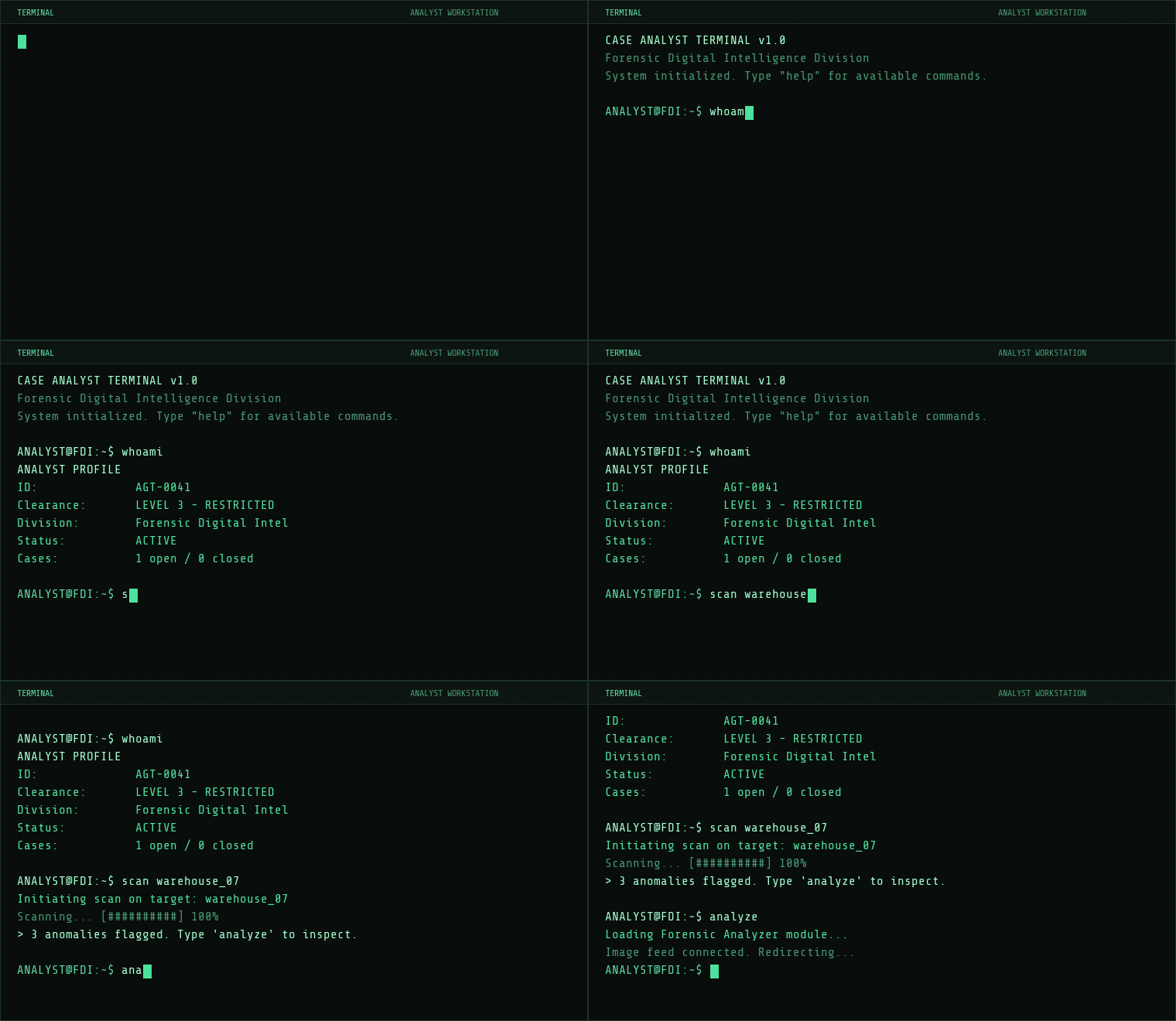
ListView of TerminalLines rendered in Share Tech Mono.The data model: lines, senders, and a record for results
Before the parser, the state. A terminal is really just a list of lines plus a bit of bookkeeping. Each line carries who "spoke" it and whether it should animate in:
enum LineSender { user, system, error, info }

@immutable
class TerminalLine {
  final String text;
  final LineSender sender;
  final bool animate;
  // Not serialized: drives in-place progress bar animation in the widget.
  final List<String>? progressFrames;

  const TerminalLine({
    required this.text,
    this.sender = LineSender.system,
    this.animate = false,
    this.progressFrames,
  });
}
The sender is purely cosmetic — it maps to a color later — but it's the difference between a wall of green text and something that reads like a real console. The full TerminalState is just the lines, a busy flag, and the command history:
@immutable
class TerminalState {
  final List<TerminalLine> lines;
  final bool isBusy;
  final List<String> commandHistory;

  const TerminalState({
    this.lines = const [],
    this.isBusy = false,
    this.commandHistory = const [],
  });

  TerminalState copyWith({ /* ... */ }) { /* ... */ }
}
Note TerminalLine and TerminalState both have toJson/fromJson. The terminal is part of the save game — when you reload a case, the scrollback comes back with it. The animate flag and progressFrames are deliberately not serialized: a restored line should appear instantly, not replay its typewriter effect.
The parser: a switch that returns a typed record
Here's the design decision I'm happiest with. The parser doesn't touch any state, doesn't render anything, and doesn't navigate. It's a pure function: string in, a typed record out. Dart 3 records make the return type self-documenting:
typedef CommandResult = ({
  List<TerminalLine> lines,
  bool clearScreen,
  String? navigateTo,
});
So a command can do three things: emit some output lines, ask the screen to clear, or request navigation to another panel (the forensic analyzer, the archive). That's the entire vocabulary of side effects, expressed as plain data. The parse method tokenizes, checks the command is unlocked, then dispatches with a Dart 3 switch expression:
CommandResult parse(String raw, AppLocalizations l10n, Set<String> unlockedCommands) {
  final input = raw.trim();
  if (input.isEmpty) {
    return (lines: [], clearScreen: false, navigateTo: null);
  }

  final parts = input.split(RegExp(r'\s+'));
  final command = parts[0].toLowerCase();
  final args = parts.length > 1 ? parts.sublist(1) : <String>[];

  if (!unlockedCommands.contains(command)) {
    return _accessDenied(command, l10n);
  }

  return switch (command) {
    'help' => _help(l10n, unlockedCommands),
    'clear' => _clear(),
    'scan' => _scan(args, l10n),
    'decrypt' => _decrypt(args, l10n),
    'whoami' => _whoami(l10n),
    'status' => _status(l10n),
    'database' => _database(l10n),
    // ...more handlers...
    _ => _genericCommand(command, args, l10n),
  };
}
Two things worth calling out. First, splitting on RegExp(r'\s+') means "scan the server" with sloppy spacing still tokenizes cleanly. Second, the _ => fallthrough goes to _genericCommand, not an error. That's intentional and I'll come back to it — it's how the 75-odd verbs in the game cost almost nothing to maintain.
Commands gate behind the mission
The line if (!unlockedCommands.contains(command)) is the whole progression system in one check. unlockedCommands is a Set<String> that lives on the scenario/mission state (the Game Director, covered in Part 5). At the start of a case you might only have help, scan and whoami; as the story advances, new verbs like decrypt or trace get merged in. Type something you haven't earned and you get an in-character refusal rather than a crash:
CommandResult _accessDenied(String command, AppLocalizations l10n) {
  return (
    lines: [TerminalLine(text: l10n.cmdAccessDenied(command), sender: LineSender.error)],
    clearScreen: false,
    navigateTo: null,
  );
}
Because the parser receives the unlocked set as an argument, it stays pure — the gating data is injected, not reached for. The same parser instance serves every mission; only the Set changes.
Most commands are theatre — and that's fine
A detective game needs to feel like a hacker's console more than it needs a real shell. Many commands are pure flavour: they print an init line, animate a progress bar, and stop. So instead of writing dozens of bespoke handlers, the _ => branch funnels every unrecognised-but-unlocked verb into one generic handler that fakes a convincing scan:
CommandResult _genericCommand(String command, List<String> args, AppLocalizations l10n) {
  // (an args.isEmpty branch prints a no-target variant; the rest is identical)
  final target = args.join(' ');
  return (
    lines: [
      TerminalLine(text: l10n.cmdGenericInit(target), sender: LineSender.system, animate: true),
      TerminalLine(
        text: l10n.cmdGenericProgress('[██████████]', '100'),
        sender: LineSender.system,
        animate: true,
        progressFrames: [
          l10n.cmdGenericProgress('[██░░░░░░░░]', '10'),
          l10n.cmdGenericProgress('[████░░░░░░]', '35'),
          l10n.cmdGenericProgress('[███████░░░]', '70'),
          l10n.cmdGenericProgress('[██████████]', '100'),
        ],
      ),
    ],
    clearScreen: false,
    navigateTo: null,
  );
}
That progressFrames list is the trick: the parser ships the animation script as data, and the widget replays it. The handlers that do matter — database and analyze open other panels by setting navigateTo: 'archive' or 'forensic'; whoami and status print formatted dossiers; clear returns clearScreen: true — are the minority. Everything narrative-only is one code path. New verb in a mission script? Add it to the unlocked set and it Just Works as flavour.
Every string runs through AppLocalizations (l10n), which is why you see l10n.cmdScanInit(target) rather than hardcoded English. The ASCII progress bars are language-agnostic, which helps.
The Notifier: turning a result into a typing sequence
The parser is pure; the TerminalNotifier is where the result becomes a living screen. It's a Riverpod Notifier<TerminalState>. When the player hits enter, submitCommand runs:
Future<void> submitCommand(String raw, AppLocalizations l10n, Set<String> unlockedCommands) async {
  if (state.isBusy) return;
  final input = raw.trim();
  if (input.isEmpty) return;

  // Add to history (skip consecutive duplicates)
  final history = state.commandHistory;
  final updatedHistory = (history.isNotEmpty && history.last == input)
      ? history
      : [...history, input];

  final userLine = TerminalLine(text: '${_parser.prompt} $input', sender: LineSender.user);
  state = state.copyWith(lines: [...state.lines, userLine], isBusy: true, commandHistory: updatedHistory);

  final result = _parser.parse(input, l10n, unlockedCommands);

  if (result.clearScreen) {
    state = state.copyWith(lines: const [], isBusy: false);
    return;
  }

  final currentLines = List<TerminalLine>.from(state.lines);
  for (final line in result.lines) {
    if (line.animate || line.progressFrames != null) {
      await Future.delayed(const Duration(milliseconds: 350));
    }
    currentLines.add(line);
    state = state.copyWith(lines: List.unmodifiable(currentLines));
    if (line.progressFrames != null) {
      await Future.delayed(const Duration(milliseconds: 350));
    }
  }
  state = state.copyWith(lines: /* ...append blank spacer... */, isBusy: false);
}
The isBusy flag is a small but important piece of game feel: while the output types itself out, the input is disabled and the title-bar status dot turns amber, so you can't spam commands over an animation that's still playing. The lines are appended one at a time with a delay between them, so the state mutates several times per command and the UI rebuilds incrementally — that's what produces the "machine thinking" cadence.
Navigation without coupling the parser to go_router
The parser only ever sets a string like 'forensic'. The Notifier stashes it in a pendingNavigation field that the widget drains afterwards:
String? pendingNavigation;

String? consumeNavigation() {
  final nav = pendingNavigation;
  pendingNavigation = null;
  return nav;
}
So routing logic (go_router, panel providers) stays in the widget layer where BuildContext lives, and the parser stays a pure, testable function. After awaiting submitCommand, the widget calls consumeNavigation() and decides whether to flip to the forensic tab or push the archive route.
The widget: a TextField that behaves like a shell
The visible terminal is a ConsumerStatefulWidget. The output is a ListView.builder over terminalState.lines, each line colored by its sender:
Color _colorForSender(LineSender sender) {
  return switch (sender) {
    LineSender.user => AppColors.phosphorGreen,
    LineSender.system => AppColors.textPrimary,
    LineSender.error => AppColors.error,
    LineSender.info => AppColors.phosphorGreenDim,
  };
}
The input is a plain Flutter TextField with every "helpful" mobile feature switched off — autocorrect, suggestions, smart dashes and quotes would all wreck command syntax:
TextField(
  controller: _controller,
  focusNode: _focusNode,
  cursorColor: AppColors.phosphorGreen,
  cursorWidth: 8,
  cursorHeight: 14,
  autocorrect: false,
  enableSuggestions: false,
  smartDashesType: SmartDashesType.disabled,
  smartQuotesType: SmartQuotesType.disabled,
  textInputAction: TextInputAction.send,
  enabled: isEnabled,
  onSubmitted: (_) => _submit(),
)
The fat 8×14 block cursor is the cheapest way to sell "this is a terminal, not a chat box." Each keystroke also fires a PlaySound(keyPress) event over the game's event bus, so the keyboard clacks.
Command history on the arrow keys
On desktop, up and down should walk the history like any real shell. I wrap the field in a Focus with an onKeyEvent handler that intercepts the arrows before the TextField sees them:
onKeyEvent: (node, event) {
  if (event is! KeyDownEvent && event is! KeyRepeatEvent) {
    return KeyEventResult.ignored;
  }
  if (event.logicalKey == LogicalKeyboardKey.arrowUp) {
    _historyUp(history);
    return KeyEventResult.handled;
  } else if (event.logicalKey == LogicalKeyboardKey.arrowDown) {
    _historyDown(history);
    return KeyEventResult.handled;
  }
  return KeyEventResult.ignored;
}_historyUp/_historyDown track a _historyIndex and stash whatever you'd half-typed in _historyDraft, so arrowing back down past the newest entry restores your draft — exactly like bash. Because mobile keyboards don't have arrow keys, there are also two little chevron buttons next to the input that call the same methods.
"Autocomplete" on mobile: command chips
You can't expect a phone player to memorize dozens of verbs, and a phone has no tab-completion. So on compact layouts the terminal shows a horizontal strip of tappable chips — one per unlocked command — that prefill the input:
void _onChipTapped(String command) {
  _controller.removeListener(_onTextChanged);
  _controller.text = '$command ';
  _controller.selection =
      TextSelection.collapsed(offset: _controller.text.length);
  _prevTextLength = _controller.text.length;
  _controller.addListener(_onTextChanged);
  _focusNode.requestFocus();
}
The chips are built straight from unlockedCommands.toList()..sort(), so the available-verbs list is always honest — it grows exactly in step with the parser's gate. The fiddly removeListener/addListener dance around every programmatic edit is there to stop my keystroke-sound listener from firing on edits the player didn't type.
The typewriter effect
Each line that has animate: true is rendered by a small stateful _TerminalLineWidget that reveals its text character by character. The whole effect is one loop with a 12 ms delay:
Future<void> _typeText() async {
  final fullText = widget.line.text;
  for (int i = 0; i <= fullText.length; i++) {
    if (!mounted) return;
    await Future.delayed(const Duration(milliseconds: 12));
    if (mounted) {
      setState(() => _displayedText = fullText.substring(0, i));
      widget.onCharTyped?.call();
    }
  }
}
The if (!mounted) return guards matter: a player can clear the screen or navigate away mid-animation, and without them you'd setState on a disposed widget. onCharTyped nudges the scroll controller to the bottom on every character, so a long block of output keeps the newest line in view as it types. Lines with progressFrames use a sibling method that steps through the bar frames instead of revealing characters.
Takeaway
The thing I'd repeat on any project like this: keep the parser pure and push every side effect into data. A command can't navigate, mutate state, or play a sound — it can only describe what should happen via a CommandResult record. That made the parser trivial to reason about, let me add dozens of cosmetic verbs through a single generic branch, and kept the messy bits — animation timing, focus juggling, go_router — quarantined in the widget. The mission system unlocks commands by editing a Set<String>. No game engine, no custom render loop — just a ListView, a TextField, and a Riverpod Notifier.
The series
- Building a detective game in pure Flutter (no game engine)
- An in-game terminal with a real command parser
- A forensic image analyzer: enhance, thermal & deepfake detection
- Field Link: a data-driven branching dialogue engine
- A data-driven mission & narrative engine (21 missions)
- One codebase to iOS, Android, macOS, Windows & Steam
- The AI asset pipeline of a solo indie game
- Shipping a Flutter game solo: what worked, what I'd change
Case Analyst is a cyberpunk detective game where you investigate by typing real commands in a terminal — out on mobile, coming to Steam on October 29. Wishlist it on Steam, and follow for the next part.
Where to find Case Analyst
- Official site: case-analyst.com
- Steam (launches October 29 — wishlist now): store.steampowered.com
- iOS: App Store · Android: Google Play
- Follow: YouTube · Instagram · TikTok · Discord